
An employee needs a ride to the airport. Another is heading to a client meeting across town. Someone else has just finished a late shift and needs transportation home.
Individually, none of these trips is difficult.
The headache usually comes later.
Finance has to work through receipts. Employees have to explain expenses. Managers want to know who is spending what, where the money is going, and whether company travel is following internal rules.
That’s the problem Bolt for Business is designed to address.
Instead of treating business rides like a collection of personal trips that have to be reimbursed afterward, Bolt provides businesses with a central account for managing work transportation, employees, spending policies, and reporting. Its business portal also supports features such as Ride Booker, employee groups, company payment methods, and downloadable ride reports.
But is it simply a business version of the regular Bolt app? What does Bolt for Business actually cost? Can you control employee spending? And how does it compare with alternatives such as Uber for Business?
Let’s take a closer look.
What Is Bolt for Business?
Bolt for Business is Bolt’s business platform for managing company transportation and, depending on the market, other business services such as food and car-sharing.
The main idea is simple: instead of employees paying for business rides themselves and submitting expenses later, a company can create a business account, add employees, and establish rules for how the company’s Bolt account can be used.
Bolt says businesses can add team members, organize them into groups, and optionally apply spending and usage limits. Employees can then use the company as a payment method when taking eligible work rides through the Bolt app.
There’s also a separate web-based business portal where administrators can manage employees, policies, payment methods, orders, and reporting.
That’s an important distinction from simply telling employees, “Use Bolt and send us the receipt.”
Bolt for Business vs. a regular Bolt account
A regular Bolt account is primarily designed for an individual rider.
A Bolt business account adds administrative controls around that usage.
With the business platform, administrators can:
- Add and deactivate employees
- Create employee groups
- Establish travel policies
- Set spending allowances
- Restrict the number or timing of rides
- Manage company payment methods
- Book rides for guests
- Review company rides
- Download receipts and reports
- Manage administrators
The exact services and features available can vary by country.
How Does Bolt for Business Work?
Getting the basic setup running is relatively straightforward.
1. Create a business account
Bolt’s business site asks companies to provide their business details and preferred payment method. Bolt then assists with setting up the account.
2. Add employees
Once the account is established, administrators can add employees who need to use Bolt for work.
Bolt also supports bulk employee uploads, which can be useful when you’re managing more than a handful of people.
3. Organize employees into groups
This is useful if different teams have different travel requirements.
For example:
- Sales team
- Operations team
- Management
- Field workers
- Regional offices
Bolt allows administrators to create groups and connect them to different travel policies.
4. Create travel policies
Travel policies are where the business controls become more interesting.
Bolt allows companies to configure rules around:
- Spending allowances
- Number of rides
- Days and times
- Service types
- Ride locations
- Expense notes
- Expense codes
For example, a company could create a policy that limits an employee or group to a particular spending allowance during a defined period.
5. Choose how rides are paid
Companies can use company-paid arrangements, including card billing or postpaid billing where available. Bolt’s support documentation also describes an employee-pay model where employees pay for the ride themselves and the company is charged a service fee per ride.
6. Employees use Bolt for work
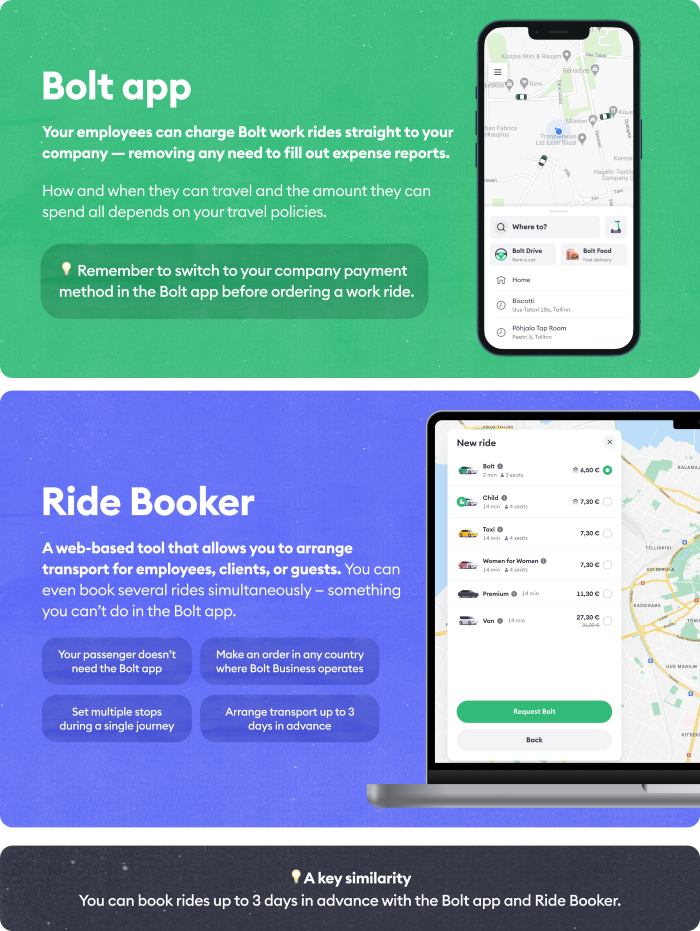
Employees who have been added to the business account can select their company as a payment method inside the Bolt app.
They can then book their work ride normally, with the company payment method applied to the trip. Depending on the company’s policy, they may also need to provide an expense reason or code.
7. Managers monitor activity
Administrators can review rides from the business dashboard and filter activity by month, employee, or group.
Reports can include details such as the trip’s location, distance, time, cost, and vehicle type. Reports can also be downloaded in XLSX or CSV format.
Bolt for Business Features
The biggest reason to consider a business account isn’t simply access to Bolt rides. It’s the layer of control and administration around those rides.
1. Company dashboard
The Bolt for Business portal gives administrators a central place to manage company transportation.
From the portal, businesses can manage employees, groups, policies, payment methods, orders, and reporting.
For an operations or finance team, having this information in one place can be much easier than collecting individual receipts from employees.
2. Employee management
Administrators can add and deactivate employees from the business portal.
This matters when your workforce changes. Someone leaves the company? Their access can be removed rather than leaving an old payment arrangement sitting around indefinitely.
3. Employee groups
Groups are useful when different teams have different travel rules.
You could, for example, create one policy for field staff and another for management.
Bolt allows groups to be connected to specific travel policies and spending limitations.
4. Spending limits
One of the more practical features is the ability to control how much employees or groups can spend.
Bolt’s travel-policy system supports spending allowances over defined periods.
This can help companies avoid the awkward situation where employees have broad access to a company payment method but little guidance about how it should be used.
5. Travel policies
Travel policies go beyond simple spending limits.
Bolt allows companies to control factors such as:
- When employees can ride
- How many rides they can take
- Where they can travel
- Which services they can use
- How much they can spend
- Whether an expense note or code is required
That gives administrators considerably more control over business travel than simply handing employees a company card.
6. Work payments in the Bolt app
Employees don’t necessarily need a completely separate app for their work transportation.
After being added to a Bolt for Business account, an employee can select the company as the payment method within the Bolt app.
That’s convenient because the employee’s personal and business transportation can remain within the same Bolt experience while the payment method distinguishes the two.
7. Ride Booker
Ride Booker is particularly interesting for companies that need to arrange transportation for people who aren’t employees.
A business can use it to book rides for clients, customers, contractors, and other guests. The administrator can enter the passenger’s details, pickup and destination, schedule the ride, and add an expense note.
This could be useful for:
- Hotels arranging guest transportation
- Companies collecting clients from airports
- Clinics arranging transportation
- Businesses hosting visitors
- Events and conferences
Bolt says rides can also be scheduled in advance, with its main business page currently advertising scheduling up to 90 days ahead.
8. Ride reports and receipts
This is where the platform can save administrative time.
Administrators can filter rides and download individual receipts. Bolt also allows ride data to be exported as XLSX or CSV files.
The available information can include:
- Employee
- Date
- Time
- Location
- Distance
- Cost
- Vehicle type
- Expense reason
For finance teams, that’s considerably more useful than a folder full of screenshots.
9. Company billing
Bolt currently documents both credit-card billing and postpaid billing options.
With credit-card billing, the trip cost is charged after each ride to the company’s card.
With postpaid billing, eligible businesses receive monthly credit and a consolidated invoice.
The billing setup available to a particular company can depend on its market and account.
10. Work Profile
Not every business needs the full Bolt for Business account.
Bolt also offers a Work Profile, a free feature in the Bolt app designed to separate work rides from personal rides.
Employees can keep business and personal rides separate, have company information appear on receipts, and forward receipts to supported expense-management systems. Bolt currently lists SAP Concur, Rydoo, Expensify, and Zoho Expense among its supported expense connections.
This can make Work Profile worth considering for an individual professional or smaller operation that doesn’t need full company-level controls.
Bolt for Business Pricing: How Much Does It Cost?
Pricing is one area where it’s easy to give a misleading answer.
There isn’t a simple “Bolt for Business costs $X per month” subscription price that applies universally.
Bolt currently advertises joining without upfront fees. However, businesses still pay for the rides and may encounter service fees depending on the billing arrangement. Actual ride prices and available services vary by location and service.
Here’s the important distinction:
| Cost | What it means |
|---|---|
| Account setup | Bolt advertises no upfront fee to join |
| Monthly subscription | No universal monthly subscription price is advertised |
| Ride cost | The business pays for eligible rides under its billing arrangement |
| Service fee | May apply depending on the payment/billing model |
| Postpaid billing | Available for eligible accounts, with monthly invoicing |
| Employee-pay model | Employee pays ride cost; company is invoiced a service fee per ride |
Bolt’s employee-pay documentation specifically says the employee can use a personal or corporate payment card for the ride, while the company is invoiced for a service fee rather than the ride cost itself.
So, is Bolt for Business free?
The business account itself can be started without an upfront fee according to Bolt’s current business page.
That doesn’t mean business transportation is free.
You still pay for rides and any applicable fees under your chosen arrangement.
This distinction is important when comparing Bolt for Business pricing with other corporate travel platforms.
What Are the Benefits of Bolt for Business?
Less expense chasing
One of the biggest advantages is administrative.
If employees regularly pay for work rides personally, someone eventually has to reconcile those expenses.
With company payment methods, eligible rides can be charged directly to the business instead.
Better spending control
Instead of telling employees to “use Bolt when necessary,” administrators can establish spending and usage rules.
That’s particularly useful when different departments have different travel requirements.
Centralized reporting
Managers can see business rides through the dashboard and export reports for further analysis.
Useful for guest transportation
Ride Booker extends the platform beyond employee travel.
A hotel, clinic, company, or event organizer can arrange transportation for someone who isn’t part of the employee account.
Scheduled business travel
Employees can schedule work rides in advance, while Ride Booker can also be used to arrange rides for guests. Bolt currently says business rides can be scheduled up to 90 days ahead.
Bolt for Business Pros and Cons
| Pros | Cons |
|---|---|
| No advertised upfront account fee | Ride costs still apply |
| Centralized business travel management | Feature availability varies by market |
| Employee groups and policies | Some businesses may need a separate expense platform |
| Spending and usage controls | Billing options can vary by account |
| Ride Booker for guests and clients | Not every Bolt service is available everywhere |
| Downloadable reports | Employee-pay arrangements can still require internal reimbursement |
| Company payment options | Some advanced features require account setup or access |
| Work Profile for simpler expense handling | Availability of Work Profile varies by country |
The biggest limitation to keep in mind is geographic and feature availability. Bolt itself notes that services and features can vary by country. Its business portal documentation also says some services, such as Bolt Food for Business, are available only in a limited number of countries.
Who Is Bolt for Business Best For?
Bolt for Business can make particular sense for organizations where employees or guests regularly need transportation.
Small businesses
A small company with a handful of employees may use it to separate business rides from personal transportation and keep company travel visible.
For very occasional travel, however, a Work Profile may be enough.
Companies with field employees
Sales representatives, technicians, consultants and other mobile employees can benefit from company-controlled business transportation.
Operations teams
Operations managers can use groups, policies and reporting to put structure around transportation spending.
Hotels and hospitality businesses
Ride Booker can be particularly relevant when a hotel needs to arrange transportation for guests or visitors.
Clinics and service businesses
Businesses that regularly coordinate transportation for customers, clients, or contractors can use Ride Booker to arrange those trips.
Growing companies
As the number of employees increases, manually processing transportation expenses can become increasingly tedious. A centralized business account provides more structure.
Bolt for Business vs Uber for Business
Bolt isn’t the only major ride-hailing company offering business transportation tools.
Uber has its own Uber for Business platform, and there are several similarities between the two.
| Feature | Bolt for Business | Uber for Business |
|---|---|---|
| Business dashboard | Yes | Yes |
| Employee management | Yes | Yes |
| Spending controls | Yes | Yes |
| Travel policies | Yes | Yes |
| Employee groups/programs | Yes | Yes |
| Guest ride booking | Ride Booker | Available through business solutions |
| Ride reporting | Yes | Yes |
| Company billing | Yes | Yes |
| Expense integrations | Available through supported features | Available through supported providers |
| Meals | Available in selected markets | Available in selected markets |
| Availability | Depends on Bolt market/service | Depends on Uber market/service |
Bolt supports employee groups, travel policies, spending allowances, Ride Booker and ride reporting.
Uber for Business likewise offers centralized management, travel policies, spending controls, reporting, billing and expense integrations.
The practical question isn’t simply which company has a longer feature list.
Check which service has the coverage, vehicle options, pricing, and specific business features your organization needs in the cities where your employees actually travel.
How to Get Started With Bolt for Business
If you want to explore the platform, the basic process looks like this:
Step 1: Visit Bolt for Business
Start with Bolt’s official business platform and provide your company details.
Step 2: Set up your account
Choose the available payment arrangement and configure your company information.
Step 3: Add employees
Upload or add the employees who need business transportation.
Step 4: Create groups
If different teams require different rules, organize employees into groups.
Step 5: Create policies
Set spending allowances, ride limits, time restrictions, locations, and other relevant rules.
Step 6: Configure billing
Choose the payment arrangement available for your account, such as a company card or eligible postpaid billing.
Step 7: Start using business rides
Employees can use the company as a payment method in the Bolt app once they’re added to the account.
Step 8: Monitor spending
Use the business portal to review rides, download receipts, and export reports.
Is Bolt for Business Worth Considering?
The answer depends heavily on how your business handles transportation today.
If your employees take occasional work rides and you’re comfortable with normal expense reimbursement, a full business account may provide more administration than you need.
But if your company regularly pays for employee transportation, client pickups, airport transfers, or field travel, the business-specific controls become more relevant.
The combination of employee management, spending rules, company payment methods, Ride Booker, and reporting gives businesses more structure than a standard personal Bolt account.
For companies operating in markets where Bolt has strong coverage, it makes sense to compare the available business features and actual ride costs against alternatives before deciding.
And if you’re in Nigeria, Bolt currently promotes Bolt for Business specifically for managing company travel costs, centralized accounts and billing, with automated ride reports.
Frequently Asked Questions
Is Bolt for Business free?
Bolt currently advertises joining Bolt for Business without upfront fees. However, rides are not free, and applicable service or billing fees can depend on the payment arrangement.
How much does Bolt for Business cost?
There is no universal monthly subscription price listed for all businesses. Your costs will depend largely on the rides your employees take, the services used, your market, and the applicable billing arrangement.
Can small businesses use Bolt for Business?
Yes. Bolt’s business offering is designed for companies of different sizes. The more relevant question is how frequently your business needs work transportation and whether the additional controls justify setting up a business account.
Can I add employees to a Bolt business account?
Yes. Administrators can add and deactivate employees through the business portal. Employees can then use the company’s payment method for eligible work rides.
Can I set spending limits?
Yes. Bolt supports spending allowances through its travel-policy system, and administrators can apply different policies to employee groups.
Can Bolt for Business book rides for clients?
Yes. Ride Booker allows authorized business users to arrange rides for clients, customers, and contractors.
Can employees pay for business rides themselves?
Yes. Bolt supports an employee-pay arrangement in which employees use their own personal or corporate payment card and claim the cost through the company’s internal expense process.
Does Bolt for Business work internationally?
Bolt operates across many markets, but business services and features aren’t necessarily identical everywhere. Check Bolt’s availability and business offering for the specific country and city where your company operates.
Does Bolt for Business provide receipts?
Yes. The business portal allows administrators to download individual ride receipts and export ride reports.
What is the difference between Bolt for Business and a normal Bolt account?
A personal Bolt account is primarily for individual transportation. Bolt for Business adds company-level administration, employee management, spending controls, policies, billing, and reporting.
Final Takeaway
The interesting thing about Bolt for Business isn’t simply that employees can use Bolt for work.
It’s what happens around the ride.
A business can organize employees into groups, establish spending rules, use company payment methods, arrange rides for guests, and pull transportation data into reports.
For a company taking only a few business trips a month, that may be more structure than necessary.
For a business dealing with regular employee travel, client transportation, or recurring ride expenses, those administrative controls can become much more valuable.
The sensible next step is to check Bolt’s current business availability and terms for your market, then compare the actual costs and features with the alternatives your company is considering.