
Some productivity apps give you a longer to-do list.
Sunsama tries to give you something different:
A day you can actually finish.
That’s an important distinction.
Because most of us don’t have a problem finding things to do.
The problem is having 37 things on your list, six meetings on your calendar, 14 unread Slack messages, three emails that need replies, and absolutely no idea what deserves your attention first.
You start the morning feeling productive.
By lunchtime, you’re putting out fires.
By 6 PM, you’ve completed half a dozen small tasks but somehow haven’t touched the work that actually mattered.
This is the problem Sunsama is designed to tackle.
Sunsama is a daily planning and productivity app that brings tasks, calendars, meetings, emails, and work from other productivity tools into a unified workspace. It then helps you turn that mess into a realistic plan for the day.
But there’s a catch.
Sunsama isn’t free forever.
And at $22 per month if you pay monthly, it’s considerably more expensive than many basic to-do-list apps.
So, is Sunsama actually worth paying for?
Let’s find out.
What Is Sunsama?
Sunsama is a digital daily planner built around one simple idea:
Plan your work around the time you actually have.
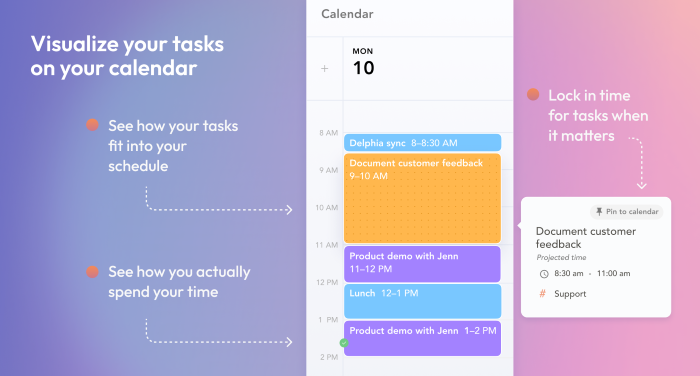
Instead of creating an enormous task list and hoping you’ll somehow finish everything, Sunsama encourages you to decide what you want to accomplish today, estimate how long each task will take, place those tasks on your calendar, and work through them one at a time.
Its guided daily planning workflow helps you review previous work, pull in tasks from connected tools, check your expected workload, arrange your day, and timebox tasks on your calendar.
That makes Sunsama feel less like a traditional to-do list and more like a combination of:
Task manager + calendar + daily planner + time tracker + focus tool.
And increasingly, AI is becoming part of that experience too.
The Problem Sunsama Is Really Trying to Solve
Let’s say your workday looks like this:
8:30 AM — Check email.
9:00 AM — Team meeting.
10:00 AM — Work on client project.
10:30 AM — Slack message.
11:00 AM — Another meeting.
12:00 PM — Try to catch up.
1:00 PM — Lunch.
2:00 PM — Remember the report you forgot.
3:00 PM — More emails.
4:00 PM — “I’ll finish it tomorrow.”
Sound familiar?
The problem isn’t necessarily laziness.
It’s unplanned work expanding to fill the day.
Sunsama approaches productivity from the opposite direction.
Instead of asking:
“How many things can I squeeze into today?”
It asks:
“What can realistically fit into today?”
That small change in mindset is the heart of the product.
How Does Sunsama Work?
The typical Sunsama workflow looks something like this:
Collect tasks → plan your day → estimate workload → schedule tasks → focus → review
You can create tasks directly inside Sunsama or pull work from other applications.
Sunsama currently integrates with tools including Asana, ClickUp, GitHub, Gmail, Google Calendar, Google Tasks, Jira, Linear, Microsoft Planner, Microsoft Teams, Notion, Outlook, Slack, Todoist, Trello, Toggl and Zapier.
Your existing work doesn’t necessarily have to be abandoned.
Instead, Sunsama can act as the place where you decide:
“What am I actually doing today?”
Sunsama Features
1. Guided Daily Planning
This is probably the feature that best explains Sunsama.
Every day, you’re guided through a planning routine.
You review what happened previously, choose tasks for the current day, look at your expected workload, and arrange your schedule.
Sunsama can also warn you when your planned work exceeds the amount of time you’ve made available.
That sounds simple.
But it’s surprisingly useful.
Because sometimes the productivity problem isn’t that you’re doing too little.
It’s that you’re planning eight hours of work into a six-hour day.
Sunsama makes that visible before you discover it at 7:30 PM.
2. Timeboxing
This is another major part of the Sunsama experience.
Instead of saying:
“Write article.”
You can say:
9:00–10:30 — Write article.
That’s timeboxing.
Sunsama allows you to drag tasks onto your calendar and assign them specific time periods.
This changes a vague intention into a concrete appointment with yourself.
And when your day gets busy, you can immediately see what needs to move.
3. Calendar Integration
Your calendar and task list don’t have to live in separate worlds.
Sunsama can integrate with Google, Outlook, and Apple iCloud calendars. You can bring meetings into Sunsama and schedule tasks alongside them.
This is useful because meetings are not imaginary time.
If you’ve already got three hours of meetings, you don’t actually have eight hours available for deep work.
Sunsama puts those constraints directly into your planning process.
4. Unified Task Management
One of Sunsama’s biggest attractions is that it doesn’t necessarily require you to abandon all your existing productivity tools.
You can pull tasks from platforms such as:
- Asana
- ClickUp
- GitHub
- Jira
- Linear
- Monday.com
- Notion
- Todoist
- Trello
and other supported services.
Imported tasks can remain synchronized with their original tools.
So if you complete an imported task in Sunsama, the corresponding task can be updated in the source application as well.
That’s an important distinction.
Sunsama isn’t necessarily trying to replace every tool your company uses.
It can sit on top of them as your daily planning layer.
5. Focus Mode
Once you’ve planned your day, the next problem is actually doing the work.
That’s where Focus Mode comes in.
Focus Mode strips the interface down to the task you’re currently working on.
You can start a timer, view your upcoming calendar, add subtasks, and move between tasks without constantly returning to the full workspace.
There’s also a Pomodoro timer option.
And if you use Slack, Sunsama can synchronize your Slack status while you’re focusing so colleagues know you may not respond immediately.
It’s a small feature.
But if interruptions are one of your biggest productivity problems, it can be surprisingly useful.
6. AI-Powered Time Estimates
This is where Sunsama gets more interesting.
Its AI can recommend how much time a task is likely to take based on your previous work inside Sunsama.
It can also recommend channels for new tasks.
For example, if you’ve repeatedly spent around an hour writing a certain type of report, Sunsama can use your history to make a more informed estimate for future tasks.
That’s different from a generic AI assistant simply guessing.
It’s using your own task history as part of the recommendation process.
7. Sunny AI Assistant
Sunsama also has an AI assistant called Sunny.
Sunny can interact with your tasks, calendar, backlog, objectives, and settings through natural-language requests.
Instead of manually moving tasks around, you can ask Sunny to help organize your work.
It can create, edit, move, or complete tasks, add subtasks, assign time estimates, connect tasks to objectives, and timebox tasks.
That makes AI less of a gimmick and more of an interface for managing your existing productivity system.
8. Weekly Objectives
Daily productivity can become meaningless if you don’t know what you’re actually trying to accomplish.
Sunsama therefore connects daily tasks to broader objectives.
The idea is straightforward:
Big goal → weekly objective → daily tasks.
That helps prevent the classic productivity trap of being extremely busy without making meaningful progress.
9. Daily Shutdown
Planning the day is only half the equation.
Sunsama also encourages an end-of-day shutdown ritual.
You can review what you accomplished, identify unfinished work, and move tasks forward instead of carrying an invisible cloud of unfinished business into tomorrow.
This fits the overall philosophy of the product:
Finish the day intentionally instead of simply stopping when you’re exhausted.
Sunsama Pricing
Here’s the part you shouldn’t skip.
Sunsama is not a free productivity app.
As of September 2026, Sunsama costs:
| Plan | Price | Details |
|---|---|---|
| Pro | $22/month | Monthly billing |
| Pro | $17/month | Billed annually |
| Enterprise | Custom | Security, compliance, SSO/SAML and other enterprise requirements |
Sunsama currently offers a 14-day free trial, with no credit card required. The trial provides access to the full product.
There is currently no free-forever plan.
Sunsama explicitly says it does not intend to offer one.
That will be a deal-breaker for some people.
For others, it’s part of what makes the product’s business model straightforward: you either use it and pay for it, or you don’t.
Is Sunsama Expensive?
Compared with basic task managers, yes.
You can find plenty of free or inexpensive to-do apps.
But that’s not really the comparison Sunsama is trying to win.
The better question is:
How much is it worth to have one place that helps you decide what to work on, when to work on it, and when to stop?
If Sunsama helps you consistently recover even a small amount of productive time every week, the subscription could make sense.
If you already have a productivity system that works perfectly, paying another $17–$22 every month may be unnecessary.
Sunsama Pros and Cons
Pros
Excellent daily planning workflow
Sunsama doesn’t just store tasks. It helps you decide what should actually fit into your day.
Calendar and tasks work together
Meetings and tasks can live in the same planning environment.
Powerful integrations
You can bring tasks and work from many existing productivity platforms into Sunsama.
Timeboxing
Tasks can be scheduled directly onto your calendar.
Focus Mode
The interface can be reduced to the task you’re actually working on.
Useful AI features
Sunsama can recommend time estimates and task channels based on your history, while Sunny can help manage your workspace through natural language.
No credit card required for the trial
You can test the full product for 14 days before deciding whether to subscribe.
Cons
No permanent free plan
After the 14-day trial, you need a paid subscription to continue using Sunsama.
More expensive than simple to-do apps
If all you need is a checklist, Sunsama may be overkill.
Requires a change in habits
Sunsama works best when you actually participate in the planning process.
If you simply dump 100 tasks into it and ignore the daily planning workflow, you’re missing the point.
The system can feel structured
People who prefer extremely flexible, minimalist task lists may find Sunsama’s planning philosophy more involved than they want.
Sunsama vs Todoist
This is an interesting comparison because the two products approach productivity differently.
Todoist is primarily a task manager.
Sunsama is much more focused on planning your day around your available time.
If your main question is:
“What tasks do I need to remember?”
A traditional task manager may be enough.
If your question is:
“What should I actually work on today, and where does it fit on my calendar?”
Sunsama’s approach becomes more relevant.
You don’t necessarily have to choose one forever, either. Sunsama can integrate with Todoist, allowing tasks to flow into the daily planning workflow.
Sunsama vs Motion
Sunsama and Motion are often compared because both combine tasks and calendars.
But they have different philosophies.
Motion puts more emphasis on automated scheduling.
Sunsama puts a stronger emphasis on intentional daily planning and helping you consciously decide what deserves your time.
If you want software to aggressively reorganize your schedule, you’ll likely evaluate the two differently than someone who wants a calmer planning ritual.
The best test is to use each with the same week’s workload and see which workflow feels more natural.
Sunsama vs Notion
Notion can be incredibly flexible.
You can build task databases, project systems, notes, wikis, and almost anything else you can imagine.
But flexibility can also create work.
You can spend a surprising amount of time building your productivity system instead of using it.
Sunsama takes the opposite approach.
It gives you a defined productivity workflow instead of asking you to build one from scratch.
That’s one of the biggest differences between the two.
Who Is Sunsama Best For?
Sunsama is particularly suited to people whose days are full of competing priorities.
That includes:
- Entrepreneurs
- Founders
- Product managers
- Designers
- Developers
- Marketers
- Freelancers
- Consultants
- Executives
- Remote workers
- Team leaders
- Professionals managing multiple projects
It’s especially useful if your work comes from several places.
Maybe you have:
Email + Slack + meetings + Asana + personal tasks + project deadlines.
Instead of mentally switching between all of them, Sunsama gives you a daily workspace where you can decide what actually matters today.
Who Should Probably Skip Sunsama?
If you have a very simple workflow, Sunsama may be unnecessary.
For example, if you only need:
- A shopping list
- Five recurring tasks
- A basic calendar
- Occasional reminders
you probably don’t need a premium daily planning system.
Likewise, if you already have a productivity workflow that you’re genuinely happy with, adding another application may create more complexity rather than less.
The key question isn’t whether Sunsama has enough features.
It has plenty.
The question is whether its planning philosophy solves a problem you actually have.
Is Sunsama Good for ADHD or People Who Struggle With Focus?
Sunsama is sometimes discussed in the context of attention and focus because its workflow reduces the number of decisions you have to make during the day.
Its Focus Mode, timers, daily planning process, and workload visibility can provide structure.
But it’s important not to treat Sunsama as a medical solution or assume that it will work the same way for everyone.
What it does provide is a structured system for deciding what you’re doing now instead of constantly scanning an enormous task list.
Does Sunsama Have a Mobile App?
Yes.
Sunsama currently provides apps for iOS/iPadOS and Android, as well as desktop applications for macOS, Windows, and Linux.
That makes it possible to keep the same planning system available across your devices.
Is Sunsama Worth It?
Here’s where I think the real decision lies.
Sunsama isn’t trying to convince you that you need another place to store tasks.
It’s trying to convince you that your time deserves to be planned differently.
That’s a much bigger promise.
If your workday regularly feels chaotic, if your task list keeps growing, or if meetings constantly destroy your plans, Sunsama’s approach can be compelling.
The biggest reason to try it isn’t the AI.
It isn’t the integrations.
It isn’t even the task manager.
It’s the daily planning ritual.
You sit down.
You look at what needs to happen.
You see the meetings already consuming your time.
You estimate the work.
You decide what can realistically fit.
Then you work through the day instead of reacting to whatever happens to appear next.
That can be a meaningful change.
But if you’re already disciplined, organized, and happy with your current system, Sunsama’s $22 monthly price may be difficult to justify.
Final Thoughts
Productivity software has a funny problem.
Most apps help you manage more.
Sunsama is built around managing less but more intentionally.
That’s what makes it different.
Instead of encouraging you to squeeze another 15 tasks into your day, Sunsama asks whether those 15 tasks belong there in the first place.
Its guided daily planning, timeboxing, calendar integration, Focus Mode, integrations, and AI assistance all point toward the same goal:
Know what you’re doing. Know when you’re doing it. Then stop working when the day is done.
And you don’t have to take that promise on faith.
Sunsama currently offers a 14-day trial with no credit card required and full access to the product during the trial.
So if your current productivity system feels more like a pile of unfinished tasks than an actual plan, that’s probably the best place to start.
Try Sunsama free for 14 days and use it with a real workweek, not a hypothetical one. You’ll know pretty quickly whether its daily planning system fits the way you actually work.
Frequently Asked Questions
What is Sunsama?
Sunsama is a daily planning and productivity application that combines tasks, calendars, and work from other productivity tools into a unified daily planning workflow.
How much does Sunsama cost?
Sunsama currently costs $22 per month when billed monthly or $17 per month when billed annually.
Does Sunsama have a free plan?
No. Sunsama currently does not offer a permanent free plan. It offers a 14-day free trial instead.
Does Sunsama require a credit card for the free trial?
No. Sunsama says its 14-day trial does not require a credit card.
What is Sunsama timeboxing?
Timeboxing means assigning a specific amount of time and a specific place on your calendar to a task. Sunsama lets you drag tasks onto your calendar and schedule when you intend to work on them.
Does Sunsama have AI?
Yes. Sunsama includes AI features for things such as task time estimates and channel recommendations, and it also offers Sunny, an AI assistant that can help manage tasks, planning, and other parts of your Sunsama workspace.
What apps does Sunsama integrate with?
Sunsama integrates with a wide range of tools, including Asana, ClickUp, GitHub, Gmail, Google Calendar, Jira, Linear, Notion, Outlook, Slack, Todoist, Trello and Zapier, among others.
Can Sunsama replace Todoist?
It can, but it doesn’t have to. Sunsama has its own task management system and can also integrate with Todoist, allowing users to bring Todoist tasks into their daily planning workflow.
Is Sunsama worth paying for?
That depends on how much value you place on structured daily planning. Sunsama is more expensive than a basic to-do app, but it combines task management, calendar planning, timeboxing, focus tools, and integrations into one workflow.
Who should use Sunsama?
Sunsama is particularly relevant for professionals, entrepreneurs, managers, product teams, and other people who have multiple projects, meetings, and competing priorities throughout the day.